
Gear Review: Why I Use onX Backcountry for Every Mission
*Please consider using the affiliate links above to support the blog!
Whether I’m skinning up a quiet ridge before sunrise, piecing together a new line, or just scouting out trailheads from the van, onX Backcountry is always part of my toolkit. It’s one of the most useful apps I rely on in the backcountry, especially when I’m planning splitboard missions or exploring new zones with sketchy cell service.
Here’s why it’s my go-to and some of the features I use most:
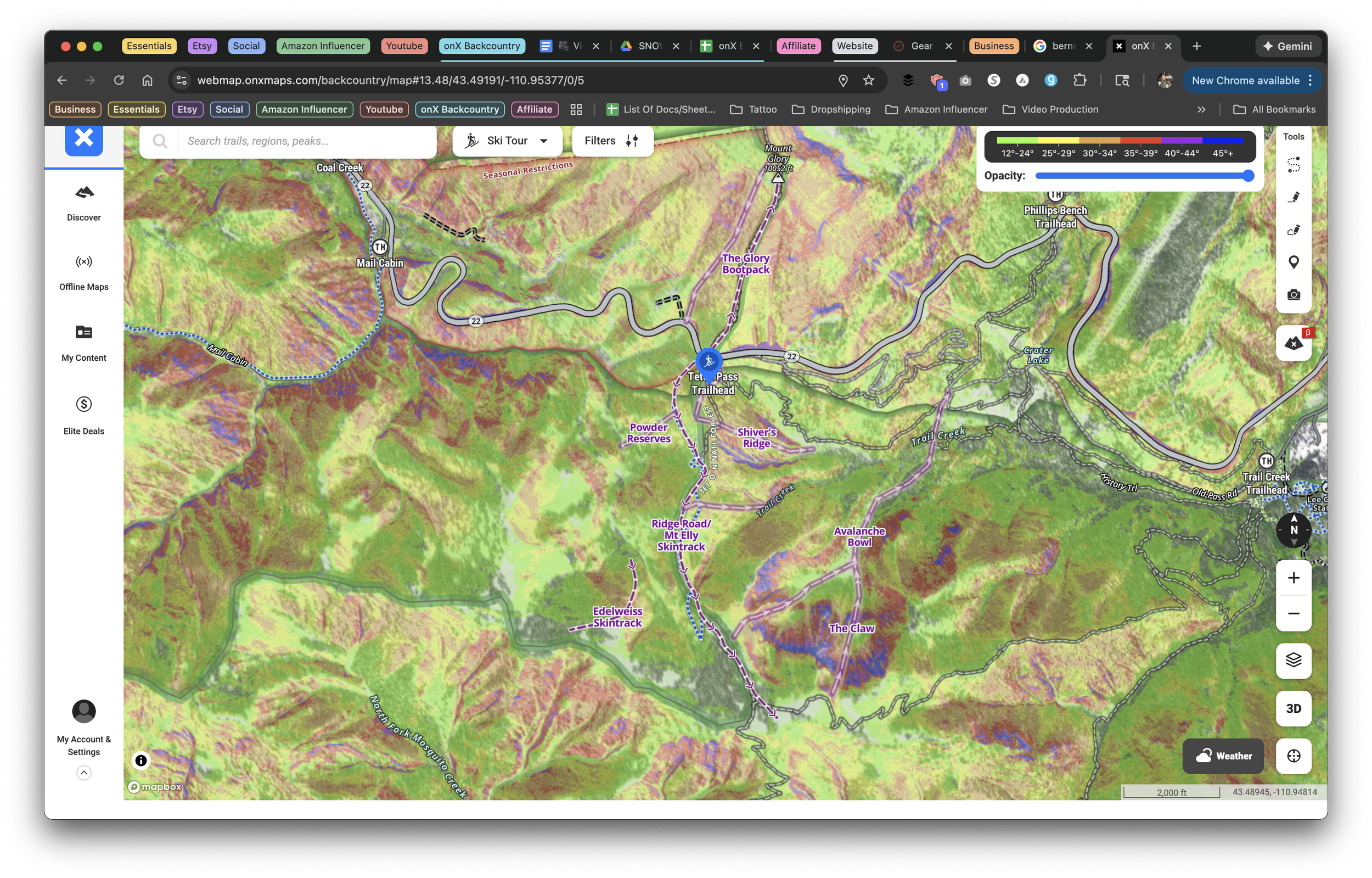
ATES, Slope Angle and Aspect Layers Made Simple
One of the biggest game-changers for me is how easily I can toggle between ATES (Avalanche Terrain Exposure Scale), slope angle, and slope aspect layers. With just a couple taps, I can see what kind of terrain I’m getting into, how steep it is, and what direction it faces. All of this helps me make better calls when evaluating avalanche risk.
If you’re planning a tour and want to avoid certain aspects due to wind loading or sun exposure, or just want to keep your descent mellow, it’s all right there. Clear, reliable info in one place without flipping between tools.
Offline Maps When Cell Service Disappears
Let’s be real. Most of the best zones don’t have service. That’s why offline maps are a must. Before heading out, I always download the route and surrounding area so I can see topographic lines, trailheads, and terrain details even with my phone in airplane mode.
You can save big areas with full detail and every layer you need. It works seamlessly and gives me total peace of mind when I’m deep in the mountains.
Waypoints and Route Planning That Actually Make Sense
Some apps make it hard to mark a spot or sketch a route. Not onX. I use waypoints to tag everything—parking spots, skintrack transitions, potential hazards, cool descents to remember, and even random pull-offs I find while driving.
Their route mapping tool is just as easy. You trace the line right on the map and get instant details like mileage and elevation gain. Super helpful for dialing in a tour plan before I ever leave the van.
3D Maps for Visualizing the Line
The 3D map feature is honestly one of the coolest parts of the app. Being able to tilt and rotate the terrain lets you get a feel for how ridgelines, bowls, and valleys connect before you ever put skins on.
It helps me understand the bigger picture of an area. This is especially useful when linking multiple zones or trying to avoid terrain traps.
Avalanche Forecasts Built Right In
Another feature I use all the time is the built-in avalanche forecast integration. It pulls in real-time avy info from your local forecast center so you can stay current while planning your day.
No extra apps or browser tabs needed. You get avalanche danger ratings, weather, and special bulletins right where you’re planning your route.
A Few More Perks Worth Noting
Land boundaries and trail data help you stay on public land and out of trouble
Elevation profiles make it easy to gauge difficulty and avoid surprise climbs
Syncs across devices so I can plan on my laptop and navigate from my phone
Final Thoughts
For me, onX Backcountry is more than a map app. It’s a route planner, safety checker, navigation system, and offline backup all rolled into one.
Whether I’m hunting powder lines or linking up sunny corn laps in the spring, I rely on this app to help me make solid decisions in the backcountry.
If you’re heading into the mountains this season, make sure onX Backcountry is part of your setup. Just don’t forget to download your maps before you lose service.
Want to see it in action? Check out our YouTube channel or drop us a message on Instagram. I’m always down to talk tour planning.
Stay safe and enjoy the ride
The Scenic Detour
